
What Are Synonyms?
Synonyms are alternative names or terms that can be added to certain metadata values in Synchtank. They help ensure that searches return accurate results even when users type a variation of a term rather than the exact value stored in the system.
For example, if you have a Genre called "Hip-Hop" and a user searches for "Hip Hop" (without the hyphen) or "Rap", adding these as synonyms ensures their search still returns the correct results.
Synonyms affect search behaviour only; they are not displayed to end users on the front end. Adding a synonym does not change the name of the metadata value itself.
Where Synonyms Can Be Added?
Synonyms can be added to any of the following metadata categories in the Admin:
| Category | Admin Path |
|
Genres |
Admin → Metadata → Genres |
| Sub-genres | Admin → Metadata → Sub-genres |
| Moods | Admin → Metadata → Moods |
| Sub-moods | Admin → Metadata → Sub-moods |
| Keywords | Admin → Metadata → Keywords |
| Instruments | Admin → Metadata → Instruments |
| Sub-instruments | Admin → Metadata → Sub-instruments |
| Vocals | Admin → Metadata → Vocals |
| Mix Type | Admin → Metadata → Mix Type |
| Mix Variations | Admin → Metadata → Mix Variations |
| Catalogs | Admin → Metadata → Catalogs |
| Sub-catalogs | Admin → Metadata → Sub-catalogs |
How to Add Synonyms?
Synonyms can be added when creating a new metadata value or when editing an existing one. The steps are the same for all categories listed above.
Adding a synonym to a new value
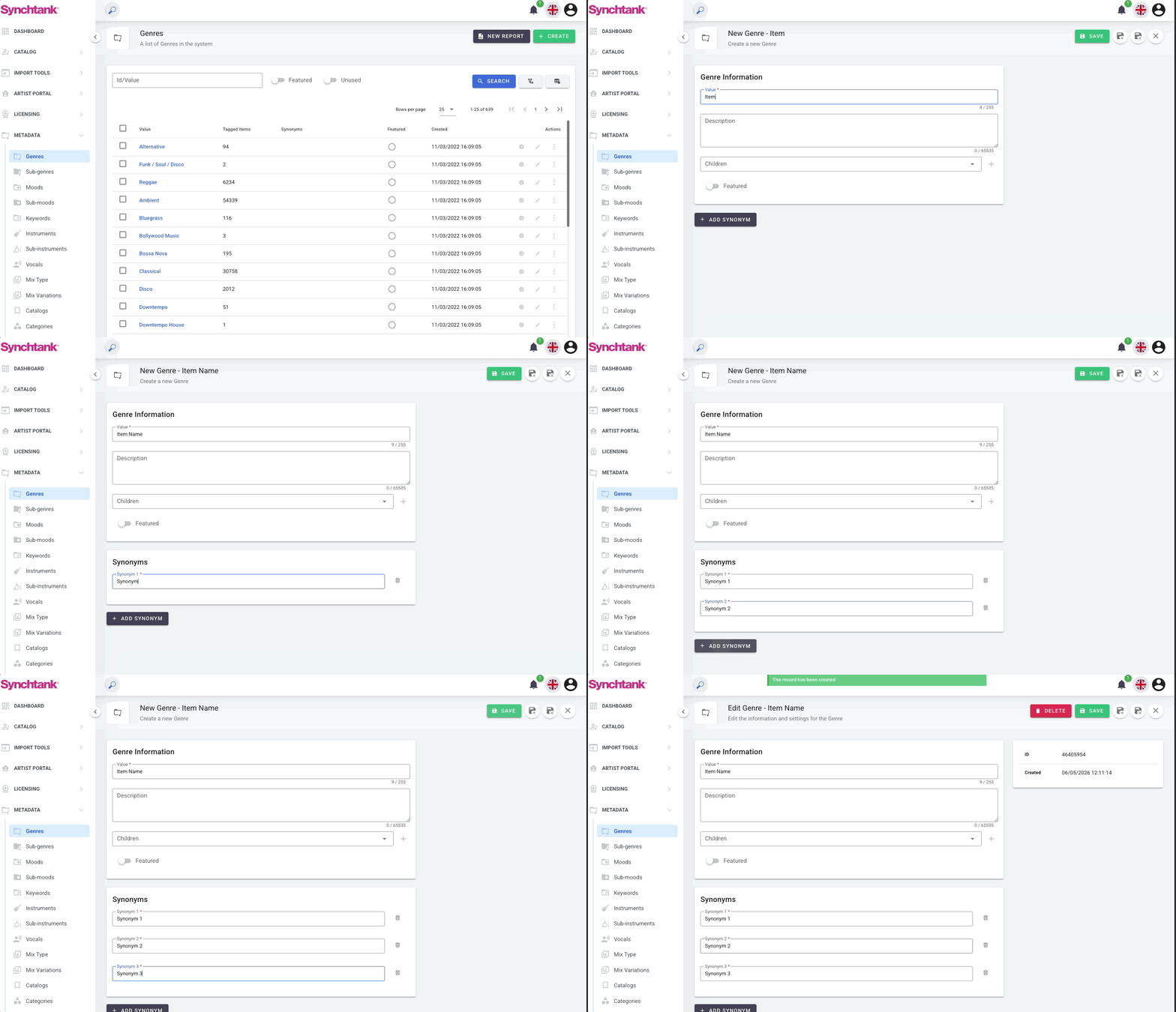
- Go to Admin → Metadata and select the category you want to work with (e.g., Genres)
- Click the + Create button in the top right corner
- Fill in the Value field (required) — this is the main name of the metadata item
- Optionally add a Description
- Click + Add Synonym at the bottom of the form
- A new Synonym field will appear — type the alternative term you want to add
- To add more synonyms, click + Add Synonym again and repeat
- Click Save when done
Adding/Deleting/Editing a synonym to an existing value
- Go to Admin → Metadata and select the relevant category
- Find the item in the list and click the Edit (pencil) icon on the right
- Scroll down to the Synonyms section at the bottom of the form
- From here you can:
- Add a new synonym — click + Add Synonym and type the alternative term in the field that appears
- Edit an existing synonym — click directly on the synonym field and update the text
- Delete a synonym — click the trash icon next to the synonym you want to remove
- Click Save when done
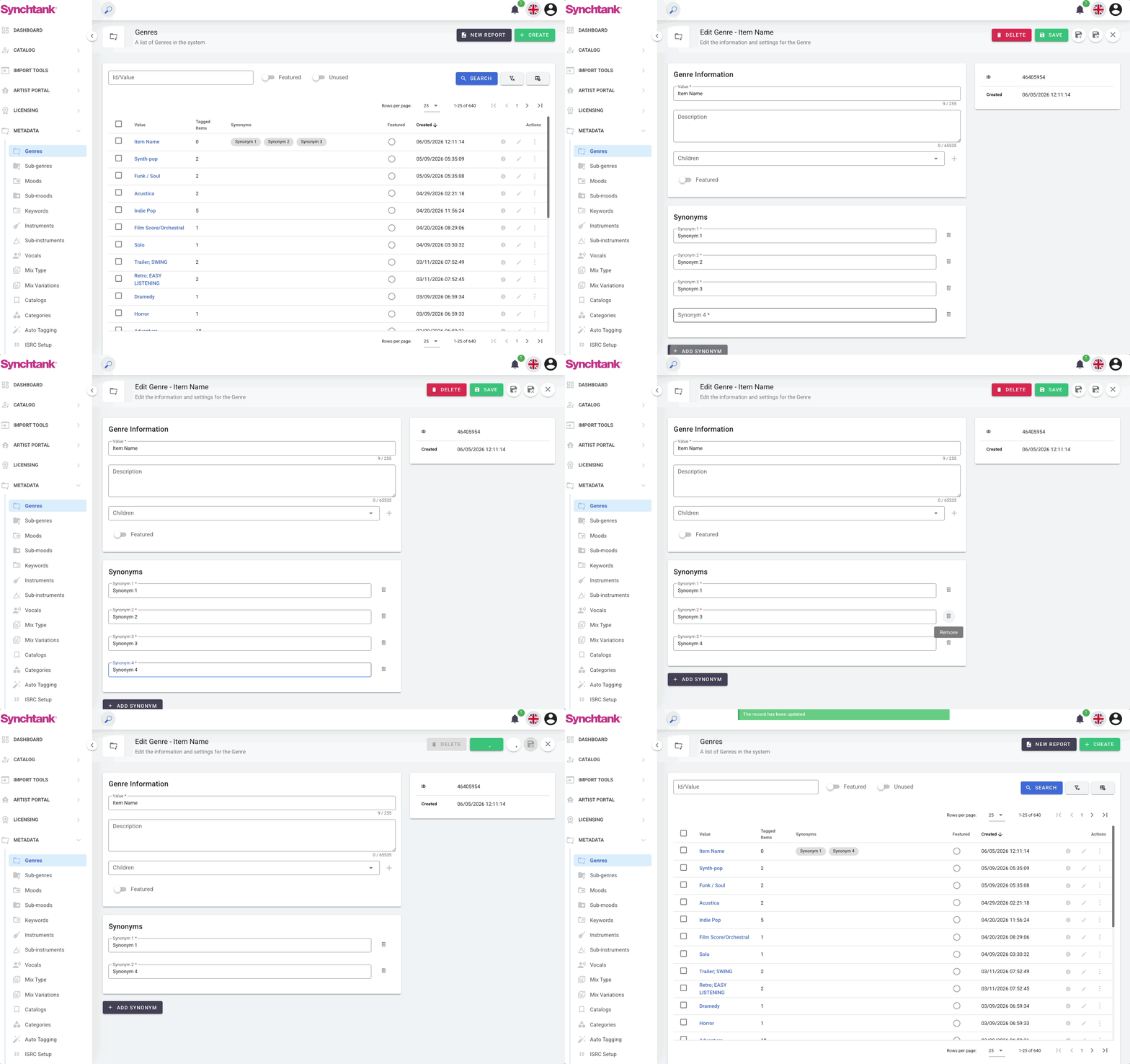
You can add as many synonyms as needed to a single metadata value. Each synonym gets its own field. To remove a synonym, click the trash icon next to it before saving.
Viewing Existing Synonyms
From any metadata category list view (e.g., Admin → Metadata → Genres), you will see a Synonyms column in the table. This shows how many synonyms have been added to each item at a glance.
To see the actual synonym values, open the item by clicking its name or the edit icon.
Best Practices
When to add synonyms
-
Spelling variations — e.g., "Synth-pop" and "Synth Pop"
-
Abbreviations — e.g., "R&B" for "Rhythm and Blues"
-
Alternative names commonly used in the industry
-
Common misspellings that users are likely to search for
What to avoid
-
Do not add synonyms that are too generic — this can cause unintended results in search
-
Do not duplicate synonyms across multiple values unless intentional
-
The Value field (the main name) does not need to be added as a synonym — it is already searchable by default
Tip: If you notice that users are not finding content they expect to find when searching, adding synonyms to the relevant metadata values is often a quick and effective fix.
Frequently Asked Questions
Will users see the synonyms on the front end?
No. Synonyms are not displayed to users. They only affect search behaviour behind the scenes. The metadata value name (the Value field) is what users see on the front end.
If I add a synonym, does it change the metadata value's name?
No. The Value field is the official name and stays unchanged. Synonyms are additional search terms only.
Can I add synonyms in bulk via a spreadsheet?
No. Synonyms must be added manually through the Admin interface for each metadata value individually.
How many synonyms can I add to one value?
There is no set limit. You can add as many synonyms as needed by clicking + Add Synonym repeatedly.
Can synonyms be added to Artist names?
Yes, artist synonyms are supported in the platform. However, this is managed separately from the Metadata section. Please contact your Synchtank team if you need assistance with artist synonyms.