
Search
Key features of our music player:
- Uninterrupted listening: Explore different pages without pausing your tunes. The music player runs independently, keeping the music flowing.
- Playback control for artists and admins: Anonymous (non-logged-in) visitors hear a shortened preview of each track, while logged-in users with the appropriate access enjoy full tracks with no restrictions. The preview length can be configured for you by the Synchtank team - to set or change it for your site, contact your Synchtank account manager or raise a support request.

How to use the music player:
- Play and pause: Use the Play (>) and Pause (II) buttons to control playback.
- Navigate tracks: Scroll through tracks in a playlist using the Forward (>>) and Backward (<<) buttons.
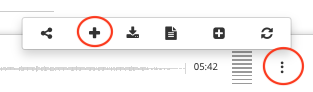
- Add to playlist: To add the current track to your playlist, click the plus (+) button after selecting the 3 dots icon. Duplicate songs are not allowed in playlist.
- Automatic track selection: If no playlist is selected, tracks will automatically populate from the site's Featured Tracks.
- Fast-forward or rewind: Click on the progress bar to adjust the song's position.