
Search
There are two ways to add ISRC codes to songs in IRIS. You can manually add them or upload and match a file containing multiple codes and songs.
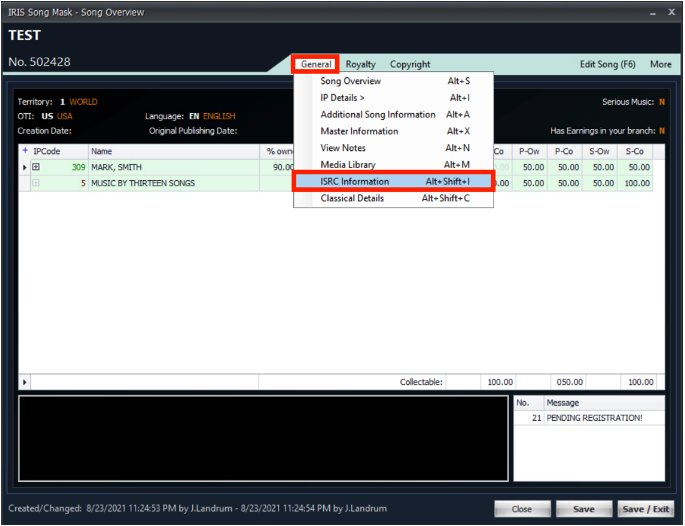
- To manually add an ISRC, open the song mask, to do this go into any search and search for the song then double click the song.

- Select General, then ISRC Information.
- The ISRC Information page will open. Select Add. A new line with the songkey will appear. You can add multiple ISRC entries.
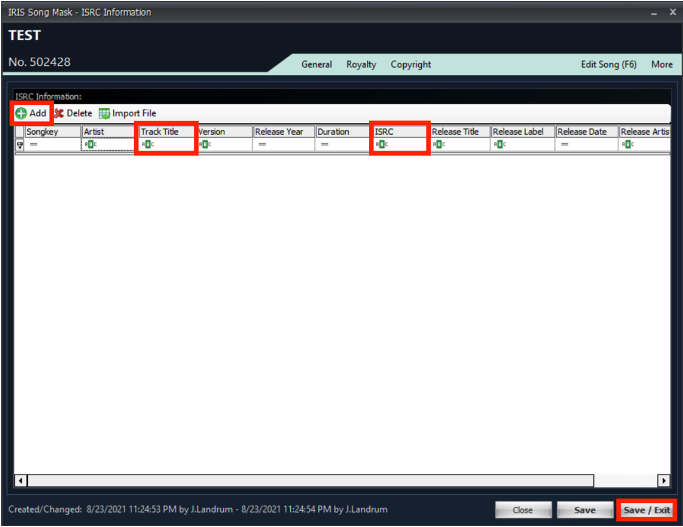
- All fields are optional except ISRC and Track Title, but please enter as much information as available:
Artist - text field
Track Title - text field (required)
Version - text field (example “Radio Edit”)
Release Year - 4 numbers (example "2016")
Duration - enter as - hh:mm:ss (example "00:03:23")
ISRC - alpha-numeric (required)
Release Title - text field
Release Label - text field
Release Date - enter based on your region - MM/DD/YYYY or DD/MM/YYYY. You can also use the calendar in the field
Release Artist - text field
UPC - not required for manual entry. Used for import files - When finished click Save / Exit in the bottom right.
How to research ISRC Information
IFPI ISRC Search is a free searchable database (based on that of SoundExchange) to obtain ISRC data.
ISRC description Site
Home — International Standard Recording Code