Search
If your clients are already set up and you need the same client and share on a group of songs, you'll use the Mass Update Module. Have the client numbers looked up ahead of time on a note makes this process fast, but not required.
- Search for the songs you would like to update. I.e., by composer, publisher, etc. You can also filter your search with the "Has Clients" field and choose client "null" or unchecked.
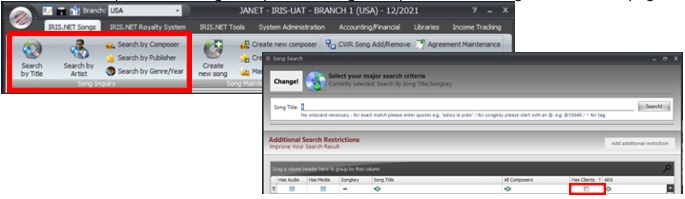
- Click once (double clicking will open the song mask) on the first song and then shift page down or arrow down until the l ast song you would like to select. Right click and choose "add to mass update".
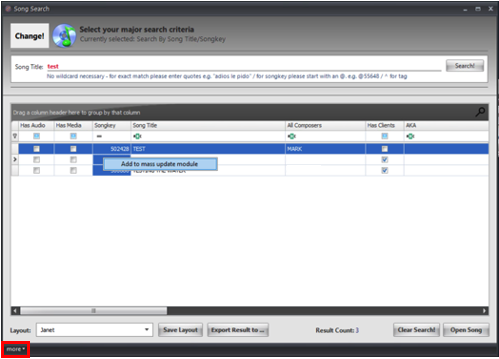
- At the bottom of the song search window, click "more" and then "open mass update" in the dropdown.
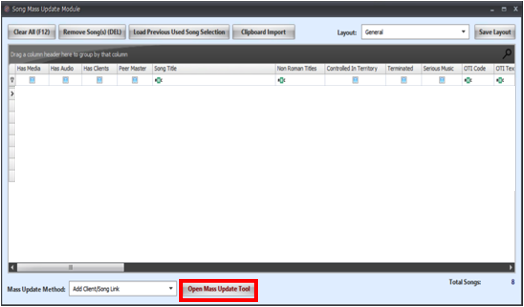
- Once inside the module, make sure the songs are the songs you want to update (you can select and delete (click Remove Song(s) (DEL)) if you got a rogue song in there. At the bottom (client/song link is the default) click Open Mass Update Tool.
- You can enter the client number in the "Value" field or search for the client by clicking the “...” which opens a search box.
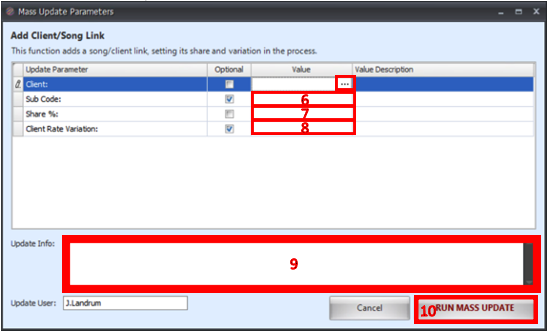
- Enter a previously entered sub code if it’s required or skip.
- Enter the share as “50” or “33.33” (or whatever) ...nothing required in description.
- Choose the client’s rate variation if necessary.
- Enter update info if you like i.e. "Client X added 4/19/21" You will also be asked if you would like to update the notes in a moment, too...do one or the other or neither.
- Click "Run Mass Update".
- Your client/ share will be added.
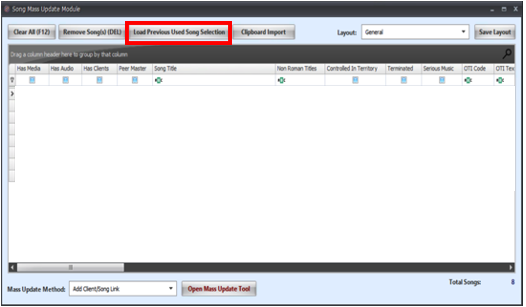
- If there is a second client to be added to those same songs, then in the mass update screen click "Load Previous Used Song Selection" and those same songs you just updated will repopulate...follow steps above to add a second client.