---
title: Artist Portal - For the Admins
description: The Artist Portal allows you to offer a place for your artists to manage their own catalog.
---
[Skip to content](https://pages.synchtank.com/support-site/artist-portal-for-the-admins#main-content)
English - United States
Show submenu for translations
[](https://pages.synchtank.com/support-site?hsLang=en-us)
Open main navigation
Close main navigation
- English - United States
Show submenu for translations
- [Submit a Ticket](https://pages.synchtank.com/support-site/create-a-ticket)
[Submit a Ticket](https://pages.synchtank.com/support-site/create-a-ticket?hsLang=en-us)
How can we help you?
- There are no suggestions because the search field is empty.
1. [Support Site](https://pages.synchtank.com/support-site?hsLang=en-us)
2. [Asset Platform](https://pages.synchtank.com/support-site/asset-platform?hsLang=en-us)
3. [Synchtank Admin/ Back-End](https://pages.synchtank.com/support-site/asset-platform?hsLang=en-us#synchtank-admin-back-end)
May 22, 2026
# Artist Portal - For the Admins
The Artist Portal allows you to offer a place for your artists to manage their own catalog.
Allowing them to upload their catalog, manage their metadata, create albums and manage their artist profiles on the system.
**Please note:** those with access to the Artist Portal aren’t always artists, they could also be managers, A&R teams, sub-labels etc. during this article we will refer to artists but know it refers to all who have access to the Artist Portal.
- [Creating an Artist](https://pages.synchtank.com/support-site/artist-portal-for-the-admins?hsLang=en-us#h_01J7ZQQDPZTHKW777PT0911RSP)
- [Artist Portal Admin](https://pages.synchtank.com/support-site/artist-portal-for-the-admins?hsLang=en-us#h_01J7ZQQDPZE9HNTPVG3Z3NNCYK)
### Artist Portal - For The Admins - How To Video:
### Creating an Artist
Firstly your artist will need to have an artist page within the Catalog section of your admin. Navigate to the Catalog section, select the artist Artist dropdown, and create your artist.[Check out this article here for creating, editing and managing your artist pages.](https://pages.synchtank.com/support-site/catalog?hsLang=en-us)
Next you need to give the artist access to their page, by assigning them as a user. So, navigate to the Users section of your admin and select Users from the dropdown.
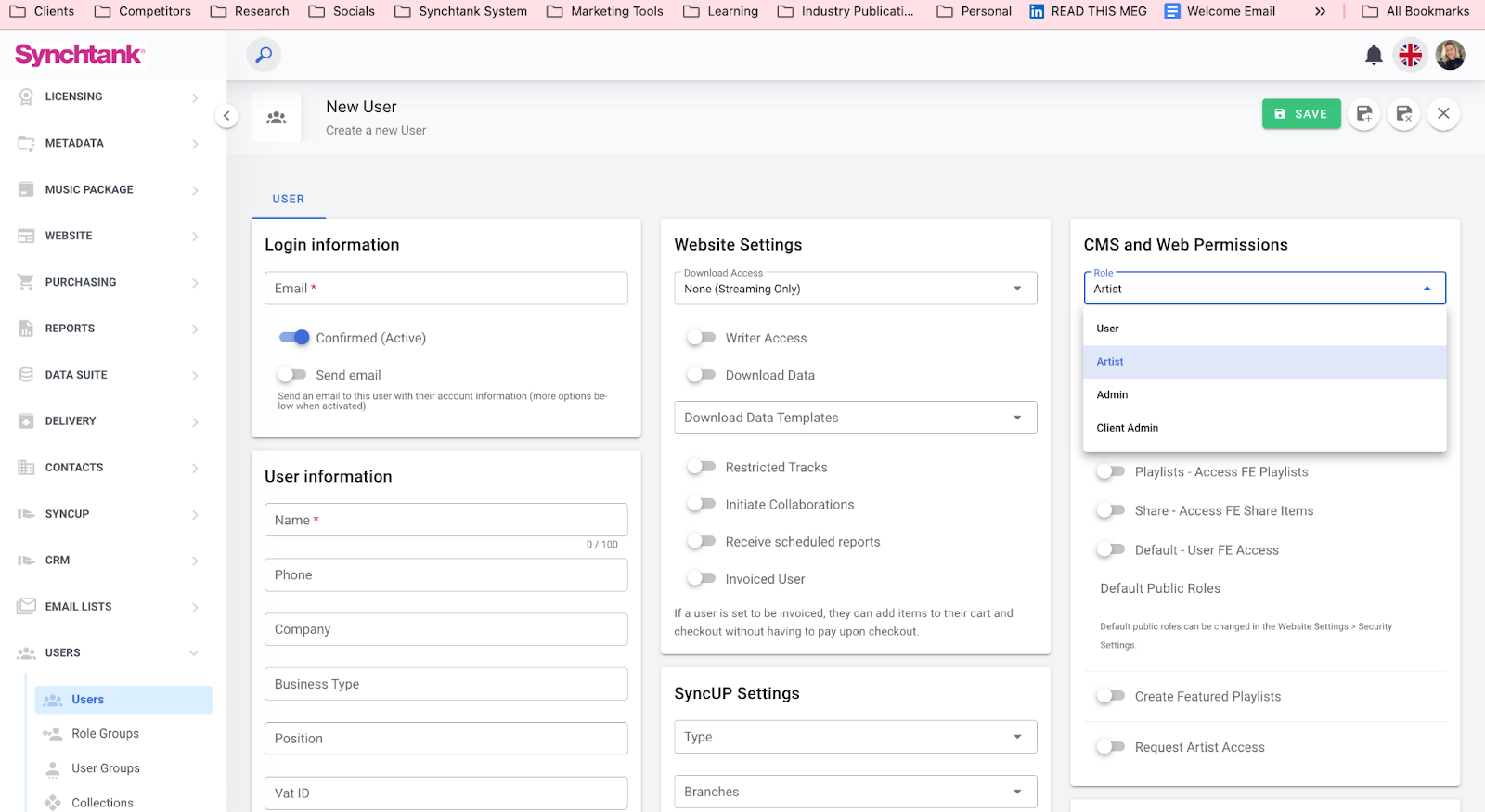
Create your user, ensuring they are assigned to the “Artist” role along with the artist accounts they have access to manage, under the CMS and Web Permissions section. [For more on user permission check out this article.](https://pages.synchtank.com/support-site/users?hsLang=en-us)
### Artist Portal Admin
Within the back-end/ admin you will see an Artist Portal section on the left hand navigation, this is where you review and manage the tracks and artists submitted to the system.
The below is a guide for Submitted Tracks but the same process is used for Submitted Arists and Submitted Albums section too.
Here you will see all the tracks submitted by your artists to the system, who has uploaded them, and the current review status. On this page you can search for tracks to make your processes quicker and more efficient.
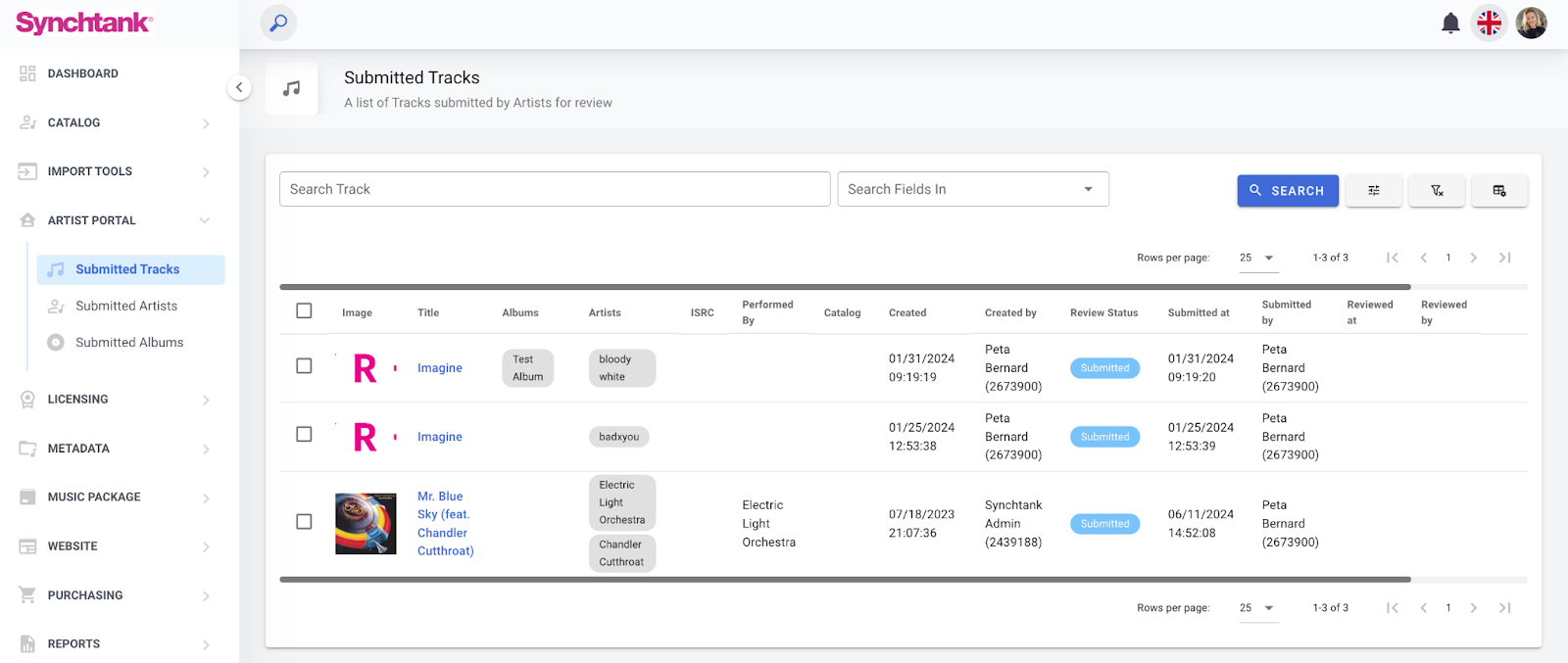
The most important action here is performing your review, on the right hand side in the very last column, there is a review icon.
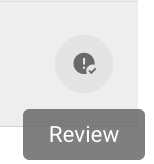
Selecting this will take you to the track details, allow you to check you are happy with the information provided by the artist and either approve or deny. You will also see any changes the artist made if you have denied it and are reviewing again.

As you can see from the blue message in the above screenshot, the track will automatically be published once approved.
- [Ticket Help](https://pages.synchtank.com/support-site/ticket-help?hsLang=en-us#main-content)
- [Ticket Help](https://pages.synchtank.com/support-site/ticket-help?hsLang=en-us#ticket-help)
- [Submit a Ticket](https://pages.synchtank.com/support-site/submit-a-ticket?hsLang=en-us)
- [Customer Portal](https://pages.synchtank.com/support-site/customer-portal?hsLang=en-us)
- [Asset Platform](https://pages.synchtank.com/support-site/asset-platform?hsLang=en-us#main-content)
- [Synchtank Admin/ Back-End](https://pages.synchtank.com/support-site/asset-platform?hsLang=en-us#synchtank-admin-back-end)
- [Front-End](https://pages.synchtank.com/support-site/asset-platform?hsLang=en-us#front-end)
- [Premium Partner Services](https://pages.synchtank.com/support-site/asset-platform?hsLang=en-us#premium-partner-services)
- [FAQs](https://pages.synchtank.com/support-site/faqs?hsLang=en-us#main-content)
- [Front-End FAQs](https://pages.synchtank.com/support-site/faqs?hsLang=en-us#front-end-faqs)
- [Dashboard FAQs](https://pages.synchtank.com/support-site/faqs?hsLang=en-us#dashboard-faqs)
- [Artist FAQs](https://pages.synchtank.com/support-site/faqs?hsLang=en-us#artist-faqs)
- [Masters FAQs](https://pages.synchtank.com/support-site/faqs?hsLang=en-us#masters-faqs)
- [Compositions FAQs](https://pages.synchtank.com/support-site/faqs?hsLang=en-us#compositions-faqs)
- [Albums FAQs](https://pages.synchtank.com/support-site/faqs?hsLang=en-us#albums-faqs)
- [Cue Sheets FAQs](https://pages.synchtank.com/support-site/faqs?hsLang=en-us#cue-sheets-faqs)
- [Productions FAQs](https://pages.synchtank.com/support-site/faqs?hsLang=en-us#productions-faqs)
- [Placements FAQs](https://pages.synchtank.com/support-site/faqs?hsLang=en-us#placements-faqs)
- [Playlists FAQs](https://pages.synchtank.com/support-site/faqs?hsLang=en-us#playlists-faqs)
- [Import Tools FAQs](https://pages.synchtank.com/support-site/faqs?hsLang=en-us#import-tools-faqs)
- [Artist Portal FAQs](https://pages.synchtank.com/support-site/faqs?hsLang=en-us#artist-portal-faqs)
- [Micro-Licensing FAQs](https://pages.synchtank.com/support-site/faqs?hsLang=en-us#micro-licensing-faqs)
- [Metadata FAQs](https://pages.synchtank.com/support-site/faqs?hsLang=en-us#metadata-faqs)
- [Website FAQs](https://pages.synchtank.com/support-site/faqs?hsLang=en-us#website-faqs)
- [Purchasing FAQs](https://pages.synchtank.com/support-site/faqs?hsLang=en-us#purchasing-faqs)
- [Reports FAQs](https://pages.synchtank.com/support-site/faqs?hsLang=en-us#reports-faqs)
- [Delivery FAQs](https://pages.synchtank.com/support-site/faqs?hsLang=en-us#delivery-faqs)
- [Contacts FAQs](https://pages.synchtank.com/support-site/faqs?hsLang=en-us#contacts-faqs)
- [SyncUp FAQs](https://pages.synchtank.com/support-site/faqs?hsLang=en-us#syncup-faqs)
- [Users FAQs](https://pages.synchtank.com/support-site/faqs?hsLang=en-us#users-faqs)
- [Website Settings FAQs](https://pages.synchtank.com/support-site/faqs?hsLang=en-us#website-settings-faqs)
- [Admin Settings FAQS](https://pages.synchtank.com/support-site/faqs?hsLang=en-us#admin-settings-faqs)
- [Royalty Platform (IRIS)](https://pages.synchtank.com/support-site/royalty-platform-iris?hsLang=en-us#main-content)
- [Setup](https://pages.synchtank.com/support-site/royalty-platform-iris?hsLang=en-us#setup)
- [Royalties](https://pages.synchtank.com/support-site/royalty-platform-iris?hsLang=en-us#royalties)
- [Copyright](https://pages.synchtank.com/support-site/royalty-platform-iris?hsLang=en-us#copyright)
- [A&R/Creative Functions](https://pages.synchtank.com/support-site/royalty-platform-iris?hsLang=en-us#ar-creative-functions)
- [Product Updates](https://pages.synchtank.com/support-site/product-updates?hsLang=en-us#main-content)
- [Release Notes](https://pages.synchtank.com/support-site/product-updates?hsLang=en-us#release-notes)
- [What's New in Synchtank](https://pages.synchtank.com/support-site/product-updates?hsLang=en-us#whats-new-in-synchtank)
[](https://www.synchtank.com/)
[mailto:enquiries@synchtank.net](mailto:enquiries@synchtank.net)
Copyright © 2026, Synchtank Ltd.
```json
{
"@context" : "https://schema.org",
"@type" : "VideoObject",
"contentUrl" : "https://26916488.fs1.hubspotusercontent-eu1.net/hubfs/26916488/video_assets/409067313356/inherited/web_optimized.mp4",
"dateModified" : "2026-05-22T08:14:28.228Z",
"duration" : "PT6M2S",
"height" : 1080,
"name" : "For The Admin - Synchtank’s Artist Portal - How To Video",
"thumbnailUrl" : "https://26916488.fs1.hubspotusercontent-eu1.net/hubfs/26916488/For%20The%20Admin%20-%20Synchtank%E2%80%99s%20Artist%20Portal%20-%20How%20To%20Video.mp4/medium.jpg",
"uploadDate" : "2026-05-22T08:14:06.315Z",
"width" : 1920
}
```